Data Engineering 101
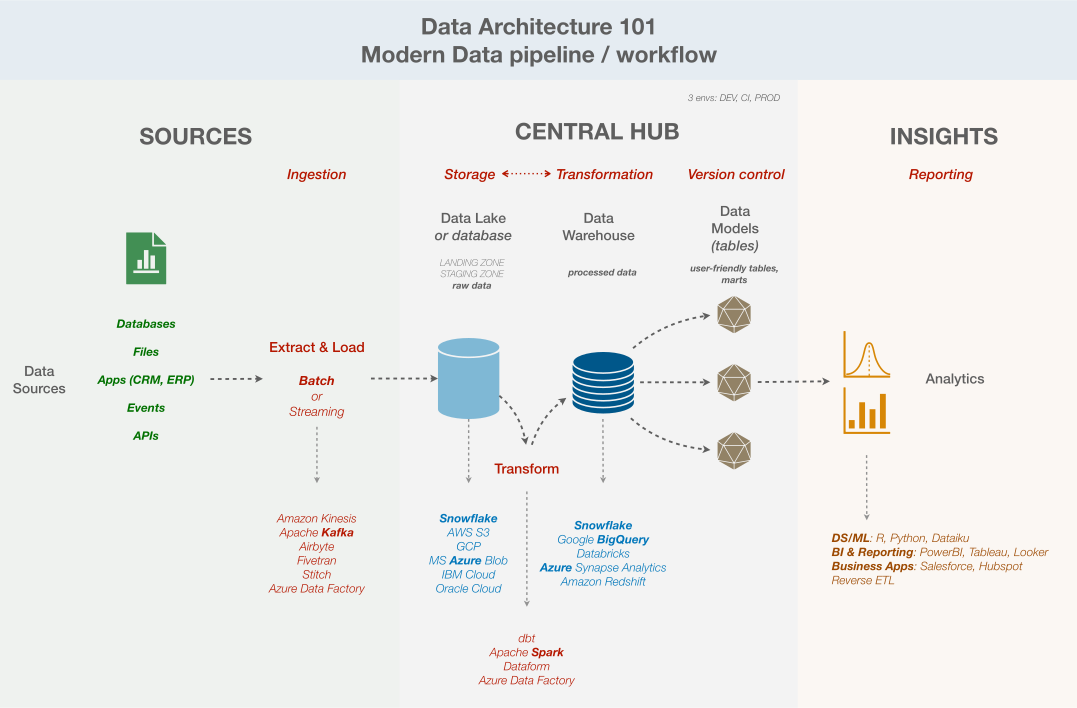 Modern data pipeline
def: data engineer is responsible to build and manage the entire data pipeline, ie from the point of data creation to the point it’s ready for analysis (ETL)
- Source systems: this is where the data is created, databases!
- Relational databases = the quintessential source system!
- but doesn’t have to be relational, can be NoSQL databases, Data Lakes, APIs, Event streams, …
- Structure (tables, keys), data types (int, text, …), relationships in the source database, ACID principles…
- E: extract data from the source = relational DB
- Processing layer: ‘T’ in ETL/ELT, for transform
- This involves scripts (python, sql or spark) to move data from the source to the warehouse, which can encompass clean, transform, ready for analysis.
- T: transform (clean, join, agg)
- Destination systems: this is where the data lands for analysis → Data Warehouse!
- e.g. snowflake, bigquery
- This involves designing the structure (dimensional modeling: star, snowflake schemas), loading the data onto it, optimising performance so that business users can query it quickly, …
- L: load data into warehouse
A distinction between
- OPERATIONAL Data systems/sources (or what commonly called “databases”): this is where apps can read-write data in real-time, they are the source of the data!
- Relational DBs: MySQL, Postgre for structured data
- NoSQL DBs: MongoDB, Cassandra for semi-structured data (JSON, XML, YAML)
- APIs/SaaS: Salesforce, Stripe for mostly semi-structured data
- Files / Data Lake: the rest with JSON logs, CSV, Images, Videos, etc. for semi-structured and unstructured data
- ANALYTICAL Data systems = basically Data Warehouses, which are systems where data is loaded into for reporting, insights and analysis!
- Snowflake, Google BigQuery, Amazon Redshift, MS Azure, etc.
Some more definitions
- Data architecture: overall design/framework for how a company manages its data, including data collection, storage, processing, access.
- The Storage Layers
- Database: (storage layer) organised collection of data, typically used for real-time operations (OLTP: online tx processing), optimised for read-write quickly (eg SQL, NoSQL)
- Data Warehouse: (storage layer) central repository that stores structure data from multiple sources, optimised for analysis and reporting (OLAP: online analytical processing), contains historical data, not just live tx
- Data Lake: (storage layer) vast storage repository that holds massive amounts of raw data in its native format, can handle (semi)-(un)structured data (ie all)
- Data Lakehouse: (storage layer) modern hybrid system that combines flexibility and low cost of data lake + management and querying features of data warehouse
- The Plumbing (moving)
- Data pipeline: automated route that data travels from one system to another, it’s literally the plumbing that moves data from point A to point B
- ETL: extract, transform, load which is a specific data pipeline, where data is extracted from source (like a db), transformed in a separate processing area, then loaded into its destination (like a dw)
- ELT: newer type of pipeline made possible with modern dw, where data can be extracted from source and loaded raw into the dw, and the transformation is done inside the dw directly
- The Engines (processing)
- Data workflow: broad term for a sequence of tasks that process data, including dependencies, orchestration, notification, etc.
- Data integration: combine data from different sources into a unified view
- The Organisation (structure)
- Data modeling: process before building a db or dw, to define how data should be structured and connected, which involves deciding on tables, keys, dimensional modeling (schema: star, snowflake), relationships, etc.
- Data governance: rules and policies that ensure that data is secure, private, accurate and used properly
Data architecture
3 types of data architecture:
- Centralised: 1 place → easy, secure, consistent but can be slow and not-flexible
- Decentralised: multiple places, close to users → speed, scalable but lack of consistency and security
- Hybrid: both, with updates and sync between them → balance performance vs. speed vs. consistency but more complex for sure
3 ways these architectures can be built and deployed:
- Cloud: scalable, low cost and fast
- On-premise (local, server): data security but not super scalable, and rather expensive
- Hybrid
Data modeling
facts vs. dimensions
source: https://www.youtube.com/watch?v=bNuWBZIItko
star schema:
- at the center: fact tables → the action
- surrounding: dimension tables → the context around the action
usually used for business action related data
e.g. transactions, orders, sales
- fact table = the transaction information (mostly keys to dimension + numerical values (metrics))
- dimension tables = the context around the transaction (more verbose, attributes, description)
- product information (price, type, colour, detail, size)
- customer information (identity, contact, location, type)
- date information
benefits to have this right:
- organisation + structure + order (in data team + others stakeholders)
- control of the logic
- data more scalable (with conventions and intentionality)
cheatsheet for data systems
i. databases
- database = structure collection of data
- query language = database language = language used to com w databases
- database management system (DBMS) = software that manages databases
- database engine = core component of a DBMS, that stores and retrieves data; used interchangeably with/ DBMS
- relational database = data org in tables with rows and columns and predefined relationships
- non-relational database = data org in flexible formats (docs, key-value, graphs) without fixed tables
- server-based = database runs as a separate service / process, but you run it yourself on laptop, in your office, on cloud VM; it’s not on someone else’s machine
- serverless = no server management, it can be either on your own engine, or cloud provider runs it for you, it just means there is no server that you personally maintain
- cloud-based = runs on someone else’s machine, such as AWS, Google, Azure
| nature | type | related to | comments | ||
|---|---|---|---|---|---|
| sql | query language | relational | mysql, postgresql, sqlite = all speak sql | structured query language | |
| nosql | umbrella term | non-relational | umbrella term for non-relational | ||
| mysql | DataBase Management System (DBMS) | relational | open-source | MariaDB | server-based, more established, open-source (but oracle owns it) |
| postgresql | DataBase Management System (DBMS) | relational | open-source | server-based, more feature-rich (complex apps, DA), open-source | |
| oracleDB | DataBase Management System (DBMS) | relational | managed | enterprise, oracle-managed, not open-source | |
| sql server | DataBase Management System (DBMS) | relational | managed | microsoft-managed, windows/linux centric | |
| amazon RDS | Managed service (DBMS hosting service) | relational | cloud | mysql, postgresql | amazon-managed, not a DB itself, it runs MySQL/PostGresql for you |
| Google cloud SQL | Managed service (DBMS hosting service) | relational | cloud | mysql, postgresql | google-managed, not a DB itself, it runs MySQL/PostGresql for you |
| Azure SQL | DBMS + Managed | relational | cloud | microsoft-managed cloud DB (not just running SQL server like amazonRDS or GoogleCloudSQL) | |
| sqlite | DataBase Management System (DBMS) | relational | open-source | serverless = embedded (mobile apps, embedded syst), no network. for lightweight apps | |
| mongoDB | DataBase Management System (DBMS) | non-relational = documents | docs like json, xml, yalm, schemaless | ||
| elasticsearch | DataBase Management System (DBMS) | non-relational = search engine | paired with other dbs for search | full-text search like log, for analytics | |
| cassandra | DataBase Management System (DBMS) | non-relational = wide-column | dynamoDB’s open-source version | time-series, IoT, high-write/high-traffic workloads | |
| dynamodb | DataBase Management System (DBMS) | non-relational = wide-column | cassandra’s managed version (AWS) | AWS proprietary version of cassandra | |
| neo4j | DataBase Management System (DBMS) | non-relational = graph-based | |||
| redis | DataBase Management System (DBMS) | non-relational = key-value |
ii. data architectures (cloud)
- database = structure collection of data for apps to read/write transactions (customer orders, user profiles, etc.)
vs.
- storage layer = actual place where data physically lives (hard drives, SSDs, cloud bucket) e.g. S3, GCS, ADLS
- table format = organises files into tables e.g. delta lake, iceberg, hudi
- query engine = reads the tables e.g. apache spark
- data warehouses = all of the above, for analysts ⇒ BI, reporting
- data lakes = dump raw files (logs, images, videos) ⇒ ML, advanced analysis
- data lakehouse = database-like org on top of datalake ⇒ both
| nature | related to | comments | |
|---|---|---|---|
| snowlake | cloud data warehouse | Databricks (rival) | analyse massive amounts of data, can also query S3 |
| amazon redshift | cloud data warehouse | AWS | AWS’s Snowflake competitor |
| google bigquery | cloud data warehouse | serverless, separates storage + compute | |
| amazon s3 | cloud object storage | AWS | not a lake per se, cause just files, but it can become a data lake when a query engine (eg databricks delta lake, or apache iceberg) is added on top |
| google cloud storage | cloud object storage | S3, but google | same |
| azure data lake storage | cloud object storage | S3, but microsoft | actual data lake, built for analytics |
| databricks delta lake | storage layer (table format) for data lakes | Apache iceberg, hudi | this makes s3 act like a database, open-source |
| databricks lakehouse | platform | snowflake (rival) | databricks full product = delta + spark + sql + ML |
| onehouse | managed service | Apache hudi | cloud version of apache hudi, lakehouse as a service |
| apache iceberg | storage layer (table format) for data lakes | snowflake, AWS, google | Delta competitor |
| apache hudi | storage layer (table format) for data lakes | onehouse | Delta competitor |
misc) apache
- apache = free, not owned by anyone, open-source and functional
| nature | related to, competitors | comments | |
|---|---|---|---|
| apache spark | data processing engine | Databricks, dbt, Dataform | process huge datasets fast, data transformation |
| apache kafka | event streaming platform | amazon kinesis, airbyte, fivetran, stitch | moves real-time data between systems, data EL |
| apache cassandra | nosql database | AWS dynamoDB | nosql db for wide-column data |
| apache hadoop | distributed file syst + processing | cloudera | OG big data tool, grandpa of modern data engineering, mostly legacy now |
| apache ariflow | workdlow orchestration | prefect | schedules data jobs (like cron jobs on steroids), industry standard |
| apache iceberg | storage layer (table format) for data lakes | Databricks delta lake | storage layer for data lakes |
| apache hudi | storage layer (table format) for data lakes | Databricks delta lake | storage layer for data lakes |
E2E Azure DE project
source: https://www.youtube.com/watch?v=ygJ11fzq_ik
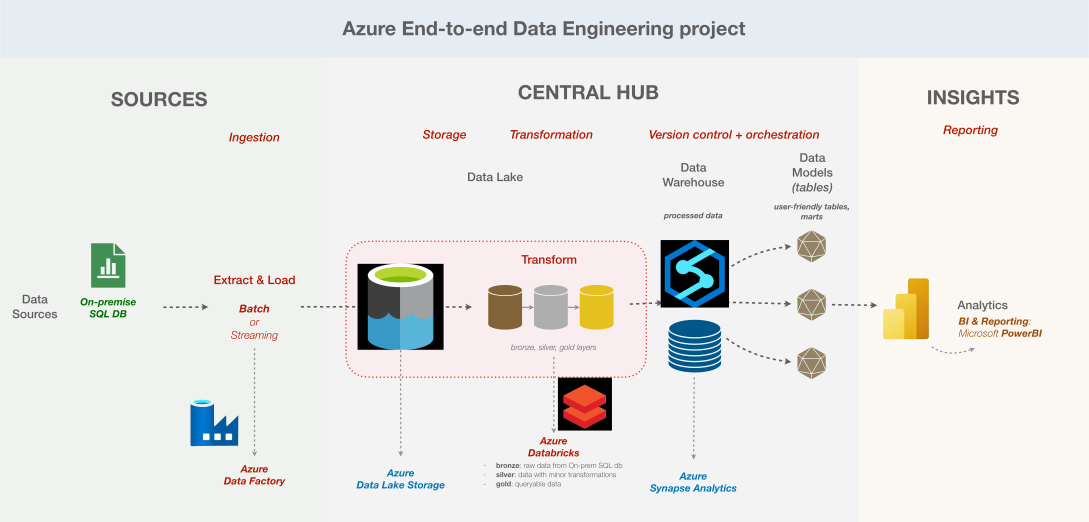 Azure data pipeline (example)
- SSMS: on-prem sql databate
- Azure Data Factory
- data pipeline ETL (ingestion, transformation, load) with Lookup → for each → notebooks
- + Azure Databricks = transformation (bronze - silver - gold) with notebooks
- Azure Synapse Analytics
- connect to gold to get the data ready for reporting, with view creation pipeline
- PowerBI
- connect to Azure Synapse Analytics to build reports
Overview
00:00:00 - Introduction
00:01:18 - Setting Up the Azure Environment
00:05:45 - SQL Database Configuration
00:10:30 - Overview of Azure Data Lake Storage
This project addresses a critical business need by building a comprehensive data pipeline on Azure. The goal is to extract customer and sales data from an on-premises SQL database, transform it in the cloud, and generate actionable insights through a Power BI dashboard. The dashboard will highlight key performance indicators (KPIs) related to gender distribution and product category sales, allowing stakeholders to filter and analyze data by date, product category, and gender.
Tech Stack:
- On-Prem SQL DB,
- Azure Data Factory (EL tool)
- Azure Data Lake Gen 2 (Lake)
- Azure Databricks (Data wh)
- Azure Synapse Analytics (Data wh)
- MS Power BI (reporting),
- (security + governance) Entra ID (Active Directory), Key Vault
“Business Request
In this project, your company has recognized a gap in understanding its
- customer demographics—specifically,
- the gender distribution within the customer base and how it might influence product purchases.
With a significant amount of customer data stored in an on-premises SQL database, key stakeholders have requested a comprehensive KPI dashboard. This dashboard should provide insights into sales by gender and product category, showing total products sold, total sales revenue, and a clear gender split among customers.
Additionally, they need the ability to filter this data by product category and gender, with a user-friendly interface for date-based queries.
Our Solution Overview
To address this request, we’ll build a robust data pipeline that
- extracts the on-premises data,
- loads it into Azure,
- and performs the necessary transformations to make the data more query-friendly.
- The transformed data will then feed into a custom-built report that meets all the specified requirements.
- This pipeline will be scheduled to run automatically every day, ensuring that stakeholders always have access to up-to-date and accurate data.”
Download 2-3 things
- The database file
- SQL Server 2025 Express (sql engine, to run the db)
- SQL Server Management Studio (SSMS, UI to interact with db using SQL)
Open SSMS
- New database → that db you downloaded
- On the left sidebar = db, tables
SSMS
00:15:23 - Configuring Azure Data Factory
00:25:11 - Copying Data from SQL to Data Lake
00:38:05 - Debugging Initial Pipeline Issues
- basically setting up some stuff on microsoft portal
- Create Resource group
- Create Data Factory
- Create Storage account
- Create Azure Databricks workspace
- Create Synapse workspace
- Create containers: bronze, silver, gold
- Create a key vault
- Create Resource group
Link Data Factory to the On-prem SQL db
- Create user login in SSMS (with username and password)
- Search for Key vault on Azure portal
- Select the key vault you created earlier
- Access control (IAM)
- Add role assignment
- Admin → Key Vault Administrator
- Objects → Secrets
- Set up your username and password
- Open Azure Data Factory
- New pipeline → copy_data
- Activity → Copy data
- source dataset: SQL server
- Linked service
- Integration runtime setup
- Network environment → Self-hosted
- Server and Database names
- → retrieve from SSMS
- Link Key Vault
- Create a new role assignment “Key Vault secrets user”
- Integration runtime setup
- Linked service
- sink: (destination)
- Create new dataset
- Azure Data Lake Storage Gen 2
- Format: Parquet
- Create Linked service
- Set file path = bronze
- source dataset: SQL server
- Activity → Copy data
- Execute!
- When it’s done, you can check on the portal that your bronze container now has this new db
- New pipeline → copy_data
Azure Data Factory
00:45:13 - ForEach Activity in Azure Data Factory
00:55:30 - Testing the SQL-to-Bronze Pipeline
01:05:30 - Recap of SQL-to-Bronze Process
01:08:41 - Debugging the Pipeline
01:10:04 - Monitoring Pipeline Runs
01:10:28 - Verifying Data in Bronze Layer
01:11:14 - Completion of the Bronze Data Layer
Do the same copy, but for all tables
- New pipeline → copy_all_tables
- Activity: Lookup
- Write query to retrieve name of each table
- → upon success
- Activity: ForEach
- Activity: Copy data
- Query: concat the schema and table name to identify the table
- Sink: bronze
- Parameters:
- schemaname: @item().SchemaName
- tablename: @item().TableName
- File path: modify with dynamic names to have more structure
- Parameters:
- Polish parameters to match input/output of each activity
- Activity: Copy data
- Activity: Lookup
Debug if necessary, but basically the Data Ingestion pipeline / process is set up with this,
the bronze container receives data!
Databricks
01:11:53 - Starting Databricks Configuration
01:14:43 - Creating a Databricks Cluster
01:17:29 - Mounting Data Lake Storage in Databricks
01:23:00 - Transformation in Databricks (Bronze to Silver)
01:33:06 - Automating Data Transformations
01:37:03 - Integrating Databricks with Data Factory
01:41:33 - Pipeline Testing and Monitoring
Now that the data ingestion part is done,
this part with Databricks is for transforming data
- from bronze
- to silver
- to gold
Open Databricks service on your Azure portal
-
Workspace on the left sidebar: notebooks
-
Compute: infrastructure to run the notebooks
-
Create a New compute
-
Create a New notebook, name: storagemount
- Write some code
- configure the mounting process
- to silver
- to gold
- connect to the compute cluster
- this basically connects the DB to your workspace
- Write some code
-
Create a New notebook, name: bronze to silver
- column transformation for clean date format → modify and save new df
- loop for all tables
- language: Python, but it’s using the PySpark library
- so it looks like pandas, but apparently for spark?
-
Create a New notebook, name: silver to gold
- column name transformation
- from PascalCase or camelCase to snake_case
- for all tables
- column name transformation
Now how to get these notebooks to run automatically
- Open Data Factory
- Go back to your copy_all_tables pipeline
- Create a New activity after that last For Each one
- upon Success
- Activity: Notebook (databricks)
- name: bronze to silver
- set up the parameters to connect everything
- need databricks token
- Activity: Notebook (databricks)
- name: silver to gold
- Publish changes
Now this took data from bronze -> silver -> gold
Synapse Analytics
01:45:25 - Loading Data into Synapse Analytics
01:50:07 - Creating Views in Synapse
01:54:40 - Integrating Synapse Views into Data Factory Pipelines
Alright now let’s load these
Open Synapse Workspace on Azure portal
- Open Azure Synapse Analytics (= Data wh)
- here you can create new db, new scripts, flow, notebooks, pipelines, … → seems like a full orchestration platform?
- Let’s start by Create SQL database in the workspace
- serverless vs. dedicated
- name: gold_db
- it’s already linked to the ADLS
- Now for that SQL db gold
- can create some views
- Can also create the views automatically with pipelines?
- Develop
- T-SQL script “createSQLserverlessview_gold”
- Link some stuff
- Integrate
- New Pipeline
- Get Metadata
- → get table name
- For each
- Stored procedure
- connect to that script to create the view
- Stored procedure
- Get Metadata
- New Pipeline
- Now when you check in the workspace, sql database, views
- you’ll see a list of views for all table names, it worked
This pipeline apparently doesn’t have to be run that often, only when the schema of the data changes (which is not often)
And voilà, basically the whole ETL pipeline is done
→ the data for reporting is ready
Power BI
01:57:57 - Power BI Dashboard Setup
02:03:11 - Building Relationships in Power BI
02:06:48 - Dashboard Filters and Slicers
02:10:01 - Publishing and Sharing Power BI Dashboards
Open PowerBI
- Blank report
- Get data
- Azure Synapse Analytics SQL
- server: serverless SQL endpoint
- load
- Azure Synapse Analytics SQL
- it’s a bit like excel honestly + more data oriented
- table view
- data model view (relationships)
- this needs to be reviewed and validated before moving on
- visualisations on the right side
- bar, column, stacked, pie, scatter, etc.
- Time to go back to business reqs to display the insights
- Get data
Some basic reporting introduction…
Automation and Active Directory
02:13:03 - Automating the Entire Pipeline
02:17:11 - Active Directory (Entra ID) Integration
02:21:33 - Triggering and Monitoring Automated Pipelines
02:29:43 - Final Dashboard Refresh and Validation
Last part, how to automate the entire pipeline so that it updates everyday (ie the source sql database content is actually included in the central and end systems)
To automate pipeline,
- Open Data Factory Studio
- this is where you have the ETL pipeline :)
- Add triggers
- schedule: everyday
- Try to add a new row to your table in sql database
Some security and access things…
And by the end of this, the pipeline runs everyday to update the data from source -> data wh -> insights automatically
practical guide from Kahan
modern data (engineering)
- overwhelming because of constant flood of information → indecision, insecurity, mess
here’s a practical guide to help cut through the noise, by addressing 3 common problems:
- Overwhelm: too many options (solution: focus on the 5 key components below vs. all tools)
- Structure: end-to-end design is unclear (solution: build a simple stack vs. complex)
- Time: takes a long time to implement (solution: focus on a single deliverable vs. everything at once)
problem 1: overwhelm
if too many tool options is overwhelming, focus on components / concepts instead >>> tools
if you start with tooling, ⇒ generic questions like
- which tools should i be using?
- what tool is better?
- etc.
leads to a long list of modern data tools → still indecision and still overwhelming
- Source Data
- Databases, Files, Apps, Events
- EL (Batch or Streaming processing)
- Apache Kafka
- Amazon Kinesis
- Cloud Data Warehouse
Raw Data → Transform (data-build-tool (dbt), Apache Spark, Dataform) → Model
- Snowflake
- Azure Synapse Analytics
- Amazon Redshift
- Google BigQuery
- Databricks
- End users
- Data Science
- R, Python, TensorFlow, Dataiku
- BI & Reporting
- PowerBI, Tableau, Looker
- Business applications
- Salesforce, Hubspot, etc.
- Reserve ETL
- Data Science
And on the side,
- Languages & Data types
- SQL, Python, Bash/PowerShell, Jinja
- JSON/XML, YAML, DAX
- Surrounding components
- Cloud providers
- AWS, Microsoft Azure, GoogleCloudPlatform, IBM Cloud, Oracle Cloud Infrastructure (OCI)
- Data quality
- Version Control & CI/CD
- GitHub, GitLab, Bitbucker
- Infrastructure as Code (IaC)
- Terraform
- Containerisation
- Docker
- Container Orchestration
- Kubernetes, Red Hat Openshift
- Scheduling & Task Orchestration
- Apache Airflow, Prefect, Jenkins, Luigi
- Cloud providers
whatever,
instead of the tools, let’s focus on these 5 core questions instead:
- Where to consolidate data? → storage / database
- How will it get there? → ingestion
- How to clean up data? → transformation
- How to analyse data? → reporting
- How to automate workflow? → version control & CI/CD
the rest is literally “nice to have”,
those are core.
those 5 components together = foundations of your data stack
along with the 3 pillars of data engineering
SOURCES ->             CENTRAL HUB                    -> INSIGHTS
Ingestion   Storage   Transformation   VersionControl   Reporting
so an example would be:
- Storage / Database: Snowflake, BigQuery, etc.
- Ingestion: Airbyte, Fivetran, Stitch, etc.
- Transformation: dbt
- Version Control: GitHub
- Reporting: PowerBI
how to choose the “right” tools? well, depends on:
- budget
- skillset
- sources
- preferences (self-host vs. cloud, build vs buy, etc.)
“main goal as a data team is to deliver insights to a business as efficiently as possible”
≠ chase hype tools, stay rigid, obsess over tech details etc.
problem 2: structure
if end-to-end design isn’t clear, start with a simple stack
remember that successful architecture or strategy or output isn’t about how advanced or complex things are
→ instead, it’s about simplicity >>> complexity, advanced
goal: lean data architecture designed for modern workflows, with minimal tooling
key attributes + ways to think of a minimal lean data architecture:
- Cloud Database: take advantage of enhanced storage & performance capabilities
- Batch Processing: if real-time processing isn’t necessary for business decisions and processes, then it’s not worth it
- 3-Layer Data pipeline
- Staging: clean & filter source tables up front (modularity)
- Warehouse: establish a well-structured data model (e.g. facts & dimensions)
- Marts: present clean, user-friendly tables intended for analytics (e.g. reporting)
- Isolated environments:
- DEV: safe space for each developer to build new changes
- CI: pre-production area for workflow automation & testing
- PROD: “live” datasets shared to stakeholders
- Version control w/ automation: track logic changes & automate data quality checks
problem 3: time
if things take a long time to implement… focus on a single deliverable at a time
once you have your stack outlined, you should work with stakeholders to determine key deliverables, incrementally >>> not all at once
- e.g. specific report, group of metrics, data feed
- → narrow the scope and build a structured e2e pipeline, one step at a time
- ⇒ agile methodology
the benefits of this approach:
- establish rock-solid foundation: you give yourself the headspace to address edge cases up front
- avoid scope creep: you set clear expectations (e.g. single deliverable at a time)
- build trust w/ stakeholders: you get them a quick win, you are aligned w/ them
- generate momentum: you have a repeatable, more efficient process going forward
Modern Data Architectures
source: https://medium.com/@msakhatsky/modern-data-architectures-explained-a9a4e0c8d8ed
intro, facts
thanks to tremendous tech advances, lots of improvements over the years,
- corporate data
- data landscape evolved from niche focus to central pillar of modern entreprise ops
- quantity of data x10 x100 casually
- fundamental shift from batch-oriented processes to real-time data streaming
- nature of data has become super varied
- storage
- slow and expensive → SSDs = commodity, scalable, affordable
- networking
- limited perf → cloud infrastructure + 40-100G network ⇒ data throughput and latency skyrocketed
however, still many challenges
- trustworthy data
- efficient, reliable data
- integrate data from disparate sources
- transition from traditional → modern models, infra, tech, etc.
most popular data architecture today
Data Lake
- coined in 2011
- enable analytics at scale by providing unified repo for all data, from various sources that anyone in the org might need
- gained popularity with affordable and scalable storage solution = Apache Hadoop Distributed File System (HDFS)
- today = backbone of most large-scale data platforms
- Amazon S3 (Simple Storage Service)
- Azure Data Lake Storage (ADLS)
- key innovation w data lake centralised storage concept:
- decouple storage from computing
- ⇒ so although data lake = storage solution, it’s implicitly assumed that various tools can access+process data within it (SQL, etc.)
how is data organised inside the lake?
- in logical zones/layers = group data with similar lifecycles, quality, security requirements, etc.
- some common zones:
- raw data zone: ingest data w/o transformation, preserve data in its native format, maintains multiple version of data, restrict user access to prevent accidental overwriting
- conformed / curated data zone: raw data is transformed (automatically) into trusted datasets, e.g. sensitive data removed
- transformed / serving data zone: business and analytical data that have undergone domain-specific transformations, they are usually separated depending on business needs
advantages:
- cost efficiency: compared to traditional data wh, because of flexibility and scalability of cloud-based storage solutions
- elasticity: limitless on-demand storage / resources thanks to cloud computing
- schema flexibility:
- data wh impose single standard schema (i.e. schema-on-write)
- vs. data lake = raw data in whatever form → it’s up to the users to interpret and structure the data (i.e. schema-on-read)
- data quality management: kind of same idea as with the schema flexibility, the quality management in wh can be strict and impractical vs. data lake = more flexible
challenges and considerations:
- data provenance: essential to maintain data integrity, traceability
- selective raw data access: raw data = restricted access vs. data marts = authoritative (i.e. trusted) and ready-to-use data for downstream users
- agility constraints: monolithic data lake managed by 1 data team = quite difficult operationally speaking
- and, orchestration components are usually not integrated as core feature within the data lake ecosys ⇒ disparate technologies
Modern Data Warehouse
traditional data wh:
- backbone of business analytics
- reliable, structured data management
- 🔻 cost, scalability, agility challenges
- → data lakes address some of these limitations
nowadays, modern data wh = tradi data wh + data lakes
- data lake = central hub for data ingestion, large-scale transformation, including harmonisation and materialisation of data products
- and provide data for ML, DS
- → then, business-oriented datasets are published into a relational wh
- data wh = structured data to support BI capabilities
examples of modern data wh:
- Snowflake
- Databricks
- Azure Synapse Analytics
- Google BigQuery
- Amazon Redshift
advantages:
- versatility in data handling: all data format and type
- elastic scalability: decouple storage from computing ⇒ superior scalable performance on large data volumes
- enhanced BI performance: better integration with standard reporting and BI tools (vs. SQL engines for data lakes)
- real-time analytics: support real-time data analytics
- improved data pipeline performance: modern data pipelines and cloud-native ETL >>> traditional ETL processes
- flexible data modeling: schema evolution possible (on-read & others)
- cost efficiency
- enhanced data security
potential drawbacks:
- increased complexity: orchestration of multiple techs (skillset, maintenance, etc.)
- data duplication and management: since 2 architectures → data governance, synchronisation and compliance can be difficult
Data Lakehouse
- introduced by databricks team
- data lakehouse = hybrid approach
- scalability and cost-effectiveness of data lake
- analytical infrastructure of data wh
principles of data lakehouse:
- leverage existing data lake infrastructure: utilise existing data lake infra (AmazonS3, Azure Blob Storage, GoogleCloudStorage)
- ensure data consistency with ACID transactions
- support schema enforcement and evolution: possible use of star or snowflake schemas
- implement governance and auditing mechanisms
- decouple storage from computing
- direct access to data: from raw to curated
- support non-sql APIs for data processing
- embrace open data formats and API
challenges:
- technology-centric focus
- limited attention to data silos and business alignment
- centralised governance vs. agility
- inadequate addressing of data integration challenges
-